

This TestMu AI (formerly LambdaTest) review gives complete details about one of the best Cross-browser testing tools. This tutorial will give you a TestMu AI WordPress plugin review as well. TestMu AI is one of the best and latest tools for cross-browser compatibility testing. Built on the latest technologies and providing the best features to the customers it is emerging as the best tool for cross-browser testing in the cloud.
What is Cross – Browser Testing and why do you need it?
Let’s understand first what cross-browser testing is.
You can see people using different models of mobile phones, different operating systems like iOS, and Android, and also various devices like Tablets too. When you move to a desktop there are varied browsers, browser versions, and operating systems. If you are a website owner, you will need to know that the users can open your website on any of the available platforms. So, you need to make sure that your website works flawlessly on all devices, platforms, browsers, browser versions, and operating systems so that users get a seamless experience irrespective of the device that they are on. Hence you need to perform cross-browser testing.
Now, the challenge that occurs is ‘how will you get all the thousands of combinations available’? If you can buy it, then it’s awesome! Else, you’ll need a cross-browser testing tool in the cloud.
TestMu AI is one such cross-browser testing tool. You get on-demand access to 2000+ combinations of different devices, browsers, browser versions, resolutions, and operating systems.
Since the system is on the cloud, hence there is no need for maintenance. TestMu AI does that for you.
What is TestMu AI (Formerly LambdaTest)?

TestMu AI (Formerly LambdaTest) is a popular platform for cross-browser testing amongst web developers. Equipped with the latest features, the LambdaTest platform is one of the best latest tools for cross-browser compatibility testing. It is built on the latest technologies and provides the best features to you, no wonder, it is emerging as one of the best tools in the cloud.
Let’s get to know TestMu AI more in detail with its pricing structure and features.
TestMu AI Review (Formerly LambdaTest)
Features
TestMu AI is the best cross-browser testing tool as it provides various features like integrations with JIRA, Asana, Slack, Trello, Github, GitLab, VSTS, Bitbucket, and many more coming up. Also, it has enhanced the way cross-browser testing is done with the introduction of the new TestMu AI WordPress plugin and its Chrome Extension. It is the only cross-browser testing tool providing these integrations and add-on extensions.
If you look at the product UI, it is quite clean and the product is very easy to handle providing the best user experience.
Pricing
It is far cheaper than other available cross-browser testing tools. If you look at the pricing structure you’ll see a Freemium plan allowing all the features.
It runs promotional offers from time to time. If you opt for the annual plans, you’re more likely to save around 20% as you’ll find various deals going on the annual plans.
It has too many pricing plans.
Check this TestMu AI pricing page for the complete details.
TestMu AI WordPress Plugin Review (Formerly Lambdatest)

TestMu AI WordPress Plugin – An Overview
Suppose, you are a website owner, you have to make sure that the users can open your website on all the available platforms, including iOS, Android, and desktop, which have different browser versions, operating systems, etc, and that it works flawlessly. For that, you need to perform cross-browser testing. The main challenge here is how would you get all the combinations that are available to you. If you can buy them, it’s great, but if you can’t, their cross-browser testing tool comes into the picture. Here, you can use the TestMu AI tool wherein you get access to 2000+ combinations of various devices, browsers, and operating systems.
It comes with various features like integration with JIRA, Trello, GitLab, VSTS, Bitbucket, Github, Asana, slack, and a lot that keep coming up. It is known as the best cross-browser testing platform because of its innovative easy approach to testing with the use of the TestMu AI WordPress plugin and TestMu AI Chrome Extension. The products are quite easy to handle and solve major cross-browser problems while providing the best user experience.
Take full-page web screenshots
You can use the TestMu AI WordPress plugin to take full-page screenshots of the posts and pages across various desktops, browsers, and mobile phones. These screenshots will be taken on a real browser, running on the real operating systems on the cloud-connected real machines. These screenshots will be helpful to you in finding the browser compatibility issues of the WordPress pages and the posts, thereby making sure that your customers or users get the same experience across all the platforms. Hence, you can be sure about the product. With a single click, you can take direct screenshots on up to different browsers.
TestMu AI has been known to be very reliable as a tool and is up to date with all the latest browsers. Their approach is quite customer-centric and they have been developing the platform in the past months depending on the customer suggestion, which is a good thing. Their customer support is also really satisfying.
For the developers, their local hosting is like a blessing in disguise. If you work particularly on a small piece of code at a time, then its Tunnel is the best catch for you.
A lot of work that you can do on Jira and its integration feature with TestMu AI makes the work much easier. “Logging bugs” and “Assign directly to the team members” are some of the interesting features that this plugin inhibits. This plugin also helps designers in designing web pages with pixel-perfect user interfaces. With the TestMu AI plugin, you can always be on time, or even before, because it saves a lot of time. There is not even a version of the browser that is not available on this tool.
Pros:
- A Freemium plan offering 60 free real-time minutes per month
- Screenshot tests
- Responsive tests
- Third-party integrations
- Local host testing via SSH Tunnels
- 2000+ browser combinations
- Geo Proxy Testing
- WordPress Plugin
- Chrome Extension
- Custom display resolutions
- 24×7 support over Chat, call, email
- Faster environments
Cons
While there are various pros to this, it also possesses some cons. Sometimes, when you switch between browsers, the session expires. The tool cannot test downloadable mobile applications. There is no access to multiple users at the same time for the same virtual machine in the free plan. Limited browsers in the Freemium plan.
How to Sign up for TestMu AI (Formerly Lambdatest)?
TestMu AI is quite easy to sign up and use. Follow the below provided simple steps to sign up for TestMu AI.
STEP-1: Visit the Official site of TestMu AI website and click on the “Get Started Free” option available on the top right of the window.

STEP-2: Then it takes you to the signup page and from there you can sign up to TestMu AI using Google and GitHub. Otherwise, you can manually fill in the details and complete the signup process.
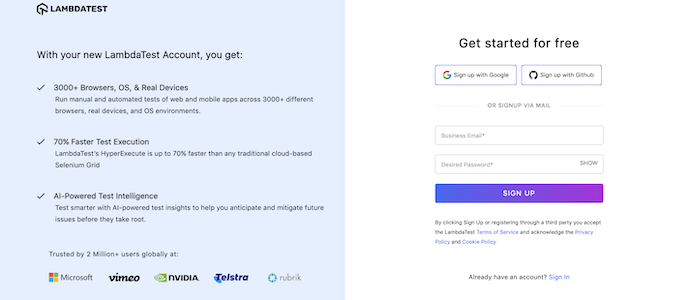
STEP-3: As soon as you hit the “Signup” option, A 5-digit PIN will be sent to the entered email ID. Enter the code and Click on “Verify” to complete the verification process. After the completion of the verification process, you can start using the TestMu AI platform.

Dashboard:
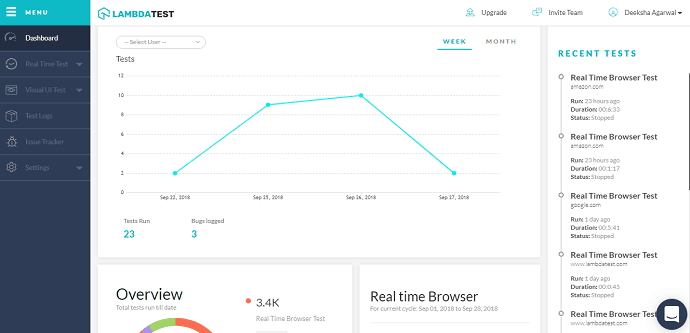
You’ll find the details of the tests performed, sessions remaining, real-time tests, screenshot tests, responsive tests, latest configurations tested on your TestMu AI dashboard.
To learn how to use TestMu AI you can refer to TestMu AI’s video tutorial:
I hope this tutorial helped you to set up the TestMu AI Review: Best Tool for Cross-Browser Testing of Your Website feature. If you like this article, please share it with your friends. If you want more blogging tips, follow BlogVwant on Facebook, Twitter, and YouTube.
TestMu AI Review – FAQs
What is TestMu AI used for?
TestMu AI will help you evaluate how well your web application renders when accessed through a variety of different browsers. You can perform automated cross-browser testing of your locally hosted web pages using TestMu AI Tunnel.
Is TestMu AI an Indian Company?
TestMu AI India Private Limited is an unlisted private company incorporated on 15 November 2019.
What are the advantages of TestMu AI?
TestMu AI provides a scalable and secure cloud-based Selenium Grid that supports a wide range of programming languages and test automation frameworks.
Is TestMu AI a good company?
TestMu AI is a great platform for serious automated and manual Testing.
What is cross-browser Testing?
Cross-browser testing refers to the practice of verifying that web applications work as expected across many different combinations of web browsers, operating systems, and devices.
Is TestMu AI safe?
TestMu AI provides a secure, scalable, and reliable cloud-based Selenium Grid that helps run Selenium tests at a faster pace.
Does Testmu AI use real devices?
TestMu AI allows you to perform mobile web automation via Appium on a wide range of real Android and iOS devices.
Can we run security testing on TestMu AI?
With TestMu AI you can test your websites on 3000+ browser and OS combinations for cross-browser compatibility issues and ensure that your webpage fallbacks are working fine on browsers that do not support SECURITY Content Security Policy Level 2.